Give It Fake Customers
Building and reviewing real software before its live integrations are ready.
I’ve been building a med-spa application with customers who don’t exist. They have appointments, move through follow-up sequences, and leave work for the staff. I can move their world forward in time and see what the software does with them.
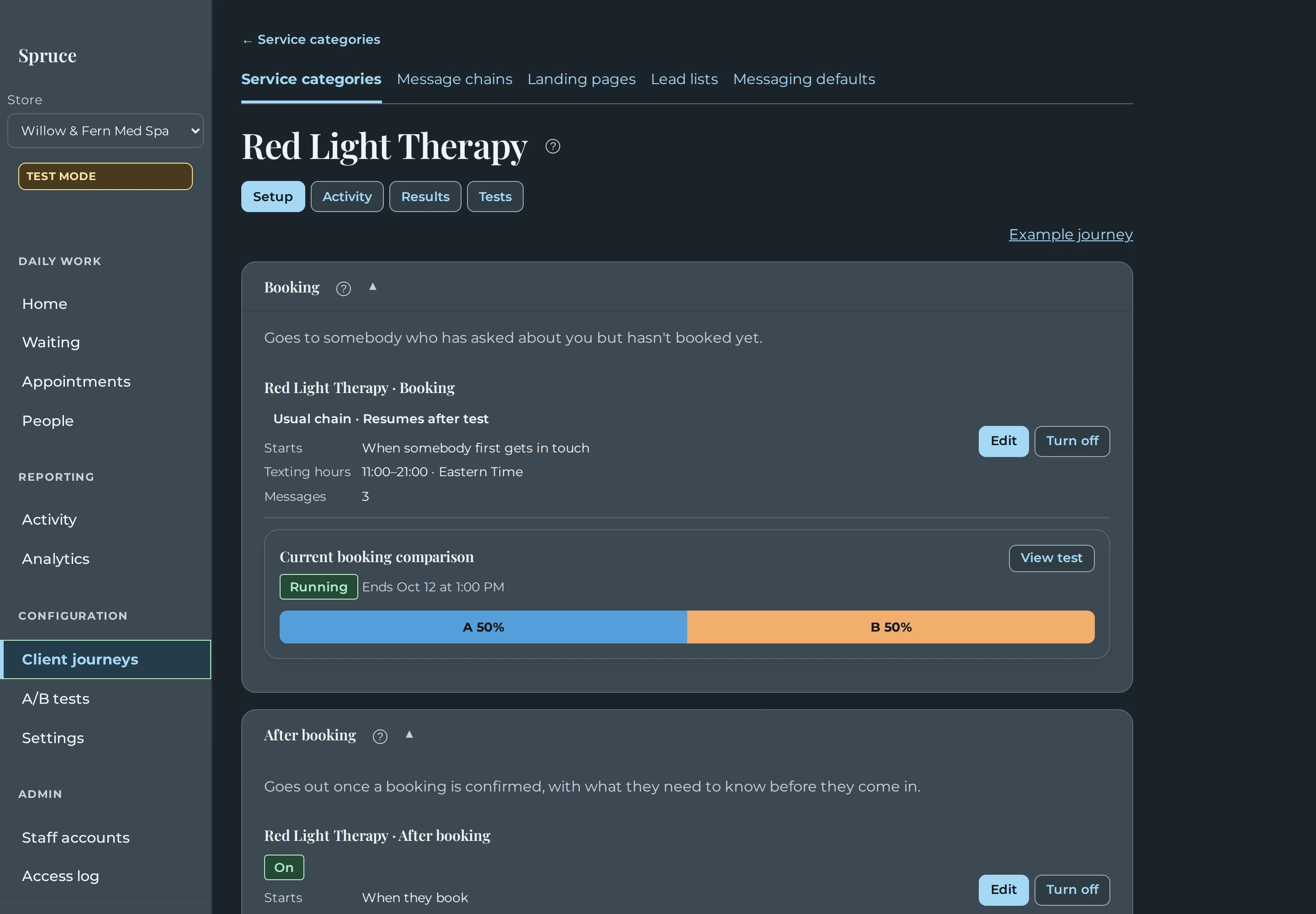
The application is real. We’re narrowing in on the interface people will use while the systems connecting it to live appointments and message delivery are still being completed. That gives me something I can operate and review now, without waiting for real customers to do things or accidentally texting someone during development.
It also answers a question worth asking before a custom software project gets too far along: how much of the experience can we actually try before connecting it to live systems? In this build, we can exercise a substantial part of the workflow with simulated data and events. That’s become useful both for how I work with coding agents and for what we can put in front of a customer for review.
Give the software a world to live in
The product is Spruce, our customer follow-up and booking workflow. It connects appointment events to configured messages and staff review. Those messages are predefined and editable. Using agents to build the application doesn’t mean we need an AI inventing what to say to every client.
A workflow like this needs more than some names in a table. Time matters. A person can be waiting for an appointment, ready for the next message, or in a situation where somebody needs to take over. The same screen has to make sense at different points in that person’s journey.
So we gave the application a simulated environment with fictional records, its own clock, and replacements for external services. Messages are captured for inspection instead of going to real recipients. We can advance the clock to exercise the timing, look at the resulting activity, and restore a known starting point when we need to run things again.
I think of these as more substantial fakes than the little canned responses you might use to test one function. They give the product enough of a world to operate in. The application still has to move information through its workflow and show something coherent to the person using it.
That distinction matters when I show someone the build. This is the product under development, including the screens we’re working toward using. Some parts are already implemented; other parts meet a simulated external system at the boundary. We still have integration work ahead of us, but we don’t have to wait for all of it to be finished before finding out whether the experience makes sense.
A place for me to get involved
My development process is entirely agentic. I describe what I want, work through decisions with the agents, and review what they build. Having a usable application early gives me a much better place to participate in that process.
I can open a client journey, look at the messages, try to change the timing, and decide whether the controls make sense. If the next thing I want to do requires searching through three other pages, I can bring that back to the agent as a specific problem. I’m reacting to the thing we built, with the context of what I was trying to accomplish.
The recent work on this application included repeated passes over message editing, delivery timing, journey navigation, assignment controls, and previews. Those are all things I need to experience together. A message editor can be perfectly understandable on its own and still be awkward to reach from the place where I’m reviewing a customer’s journey.
The simulation gives me another way to check behavior, too. I can compare what the scenario says happened with what the application tells me. If a simulated appointment changes, I want the relevant pages and next actions to agree with that change. A mismatch gives us somewhere concrete to investigate. It might be the application, the simulation, or an expectation we haven’t described clearly enough yet.
That doesn’t replace automated tests. It gives me a different view of the work. A test can check a rule we already know we want. Using the application helps me notice a question I hadn’t thought to ask, including whether a technically correct result is understandable to the person who has to act on it.
- Simulated eventA fictional client books or needs follow-up.
- Real workflowThe application applies its configured timing and rules.
- Visible resultInspect a captured message or a task for staff.
- Human reviewTry the screens and compare what happened with what you expected.
- Adjust and replayChange the behavior and run the scenario again.
↺ Reset the scenario and repeat. External messages stay captured in the test environment.
The cycle is straightforward: introduce a fictional event, let the implemented workflow handle it, inspect the captured message or staff task, and review the experience. Then change what needs changing and replay it. Because delivery is captured, we can inspect mistakes without involving a real recipient.
Agentic coding makes this especially interesting to me. I can ask for the simulation machinery as part of building the product, then use it to direct the next round of development. The agents give me something to respond to, and my response becomes more precise because I’ve actually used it.
Something a customer can use
The same environment gives us a much richer conversation with a customer. We can let someone walk through how the work would happen, including the point where the software asks a person to get involved.
A slide can explain that a client receives a follow-up message. A static mockup can show what the message looks like. In the running application, a reviewer can explore when it appears, where its history lives, how to change it, and what the next staff member would know when they open that person’s record.
Those details are where useful feedback can come from. Someone might want a different sequence, realize that a staff handoff needs more context, or ask for a step we haven’t included. Those are possibilities the review should make easy to discover, rather than things we should expect someone to anticipate from a written description.
There’s a difference in the effort we’re asking of that person. In a verbal walkthrough, they have to hold an imagined application in their head while we describe it. When the workflow is usable, they can spend that effort deciding whether it fits their work.
For an appointment-based business, we can also compress the waiting. Reviewing a delayed follow-up shouldn’t require everybody to come back several days later just to see the next step. A simulated clock lets us move forward and look at what happened, then return to a starting point for another pass.
The boundary needs to stay clear throughout that review. A convincing screen doesn’t establish that every external connection works. It lets us review the experience we’re building. Real source data, provider behavior, and controlled delivery still need their own integration testing.
Finding the missing basement
There is a cost to working this way. You’re front-loading a lot more than a set of slides or disconnected screens. The fake world needs enough behavior to be useful, the workflow needs to run, and the interface needs to let someone do more than admire it.
Our first phase became substantially larger and took longer than originally intended. It included a broad reviewable interface, configurable journeys, simulation, reporting, staff controls, and help. Agentic development made that amount of early implementation practical, but we still spent time refining it. It would be misleading to describe the whole thing as a quick mockup.
I still like the trade. I’d rather find out that the design needs another room while much of the outside world is simulated than efficiently build a castle from the ground up and discover at the end that it needs a basement.
Agents would help me add the late basement, too. I’d prefer to give them the better design earlier. Changing a flow while its external dependencies are fakes gives us room to work through the experience before we’re also responsible for how that change interacts with a live business system.
That matters here because the eventual integration involves a real Phorest installation and communication with real people. I want to test an idea repeatedly without wondering whether a development mistake has changed a live appointment or sent a confusing text. Simulated records and captured delivery give us that room while we build. Later, we have to prove the actual connections under controlled conditions.
The discipline I want to carry forward is knowing what we’re trying to learn from each round. There will always be another screen to improve. A useful review should help us settle a workflow or uncover something material, then move the project toward the next part of the build.
If you’re planning workflow automation, pick one situation your team handles often and one that regularly causes confusion. Ask to try both in the developing software, with fictional records and delivery turned into something you can inspect. Bring the person who actually does that work. Give them room to use it, and pay attention to what they try to do next.